Are you optimizing your websites images?
Images are an important part of many web sites, and can potentially bring in a lot of search engine traffic.
If your website is built with Joomla, the likelihood is that your images are not at all optimised to appear in the search engine rankings.
In this article, we look at how to optimize your images in Joomla.
SEO
Working as an SEO Manager for Mediaedge:cia, I work with a number of clients to help them ensure that their content appears on search engines. One area that some clients can see quick wins in, is image optimisation and it is becoming increasingly important.
Images drive traffic
Images are becoming increasingly important in SEO because they are sometimes included in ‘universal search results’ and when they are, they have a high click through rate (31% according to Iprospect).
Inevitably, the importance of images depends to some extent upon the industry your website is targeting. For example in the plastic surgery industry companies like Transform compete on words like Botox, Microdermabrasion and Rhinoplasty to have their images included in search results.
Images and Joomla
By default the Joomla content management system is not setup in a way which will make the most of your website’s images. In actual fact, if you keep the default settings, the search engines will not index the vast majority of the images inside your web pages!
Joomla + Images = Not Optimised
How to Optimize Your Images in Joomla
1) Change the robots.txt to permit search engines to read the images folder
When you install Joomla, by default it will setup a robots.txt file. The Robots.txt file sits in the root directory of the server and instructs search engine robots which files and folders they have permission to access. The standard robots.txt file that Joomla comes with correctly instructs robots that they cannot access or index folders like the administrator or temporary folders, however it also instructs them they cannot index any content in the images folder.
Because the images folder is the default location for all images in Joomla, the result of the inclusion is that the majority of sites built in Joomla don’t have any of their images indexed!
To solve this issue, simply edit the robots.txt file and remove the following line:
Disallow: /images/
2) Change the default location for images
If you have added images to the articles you write within Joomla, you probably have noticed that the default location for images is http://www.website.com/images/stories/. Personally I don’t like this, and it is not best practice in terms of image optimisation.
When evaluating the relevance of content on a website, search engine algorithms examine the directory and file names of the content on a site and ascribe priority to pages that are closer to the site root. In other words, when possible, try and keep content closer to the site root.
I recommend changing the default location of images from images/stories to just images/. You can do this in the Joomla Administrator backend by selecting: Site > Global Configuration > System > Media Settings and then changing the directory in the “Path to Image Folder†box.
Once you have made the change, when you add images to articles, the images will be automatically uploaded into the root images/ folder.
3) Use images on relevant page and use keyword rich file names, alt tags and title tags
Once you have changed robots.txt and the default location for images, you can now start optimising the individual images on your site to ensure they are included in the search engine index.
To optimise the image for a certain keyword or key phrase, you should ensure:
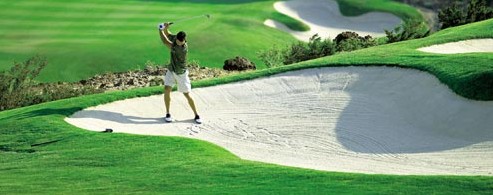
- The image is included on a page which is relevant to the image (e.g. a photo of someone playing Golf in Mauritius on a page about Golf in Mauritius)
- The filename of the image is the keyword or key phrase you are targeting and words are separated with a hyphen, for example: golf-in-mauritius.jpg
- The alt and title tag of the image should also contain the keyword or key phrase, for example, “Golf in Mauritiusâ€
- The location of the image file names should be keyword rich to improve the overall keyword relevancy. This can be accomplished by inserting keywords in the URL when Appropriate e.g. travelbison.com/images/mauritius/golf-in-mauritius.jpg
This is what an optimised image tag would look like:
<img src="http://travelbison.com/images/mauritius/golf-in-mauritius.jpg"
height="200" width="500" alt="Golf in Mauritius"
title="Playing Golf in Mauritius" />
It does not matter if the Alt and Title tags are not exactly the same but closely related keywords should be used. It is best practice to use hyphens in the filename to separate words.
More resources
There are plenty of resources online about image optimisation. Here are a few:
- Get up to date on Image Search (From the official Google Webmaster Blog)
- 19 Ways to Get More Traffic to Your Site Using Google Images (by Maki)
- Using Google Image Search to Drive Traffic to Your Site (by Caydel on YouMoz)
- How to use hotlinkers and Google Images to build natural links to your site (by Patrick Altoft)
Check out this article, you can find out which tools I use in my daily work.
Discussion
- Does your website get much search engine traffic from image search?
- Have you optimised the images on your Joomla website?
- Do you have any other tips to share about optimising images in Joomla?
Please share your opinion in the comments below
David Towers is an SEO Manager at Mediaedge:cia based in Manchester (UK). David blogs about SEO, online marketing and Joomla at Good Web Practices.